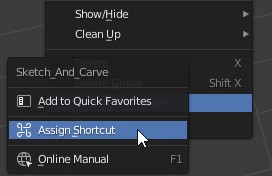
Keyboard Shortcuts |
|
Sketch N' Cage is found under "Object" menu in Object Mode, and under "Draw" menu in Draw Mode. |
|
Although "Shift+K" is assigned for Sketch N' Cage, due to a conflict with an existing shortcut it needs to be reassigned manually to work properly. Right click on the name and select "Remove Shortcut". |
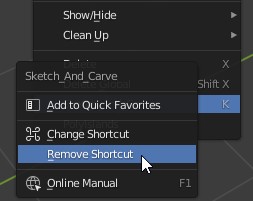
|
![]() |
|
| Right click on the name again and select "Assign Shortcut". | |
![]() |
|
Choose a letter available (single letter is best) and type it. In our case we will choose "Shift+K" again. Under Edit menu, open "Preferences" menu and save your preferences (if it is not set to Auto Save). You are good to go! |
|
| List Of Shortcuts: | |
| Shift+K | SketchNCarve |
Camera Controls: |
|
| Alt Numpad 1 | Camera Front |
| Ctrl Alt Numpad 1 | Camera Behind |
| Alt Numpad 3 | Camera Side |
| Ctrl Alt Numpad 3 | Camera Side Accross |
| Alt Numpad 7 | Camera Top |
| Ctrl Alt Numpad 7 | Camera Bottom |
| Alt Numpad . (Period) | Align To Surface |
| Alt Numpad 5 | Camera (Canvas) Swivel |
| General: | |
| D | Switch to Draw Mode and Select Pen Tool |
| Alt V | Switch to Object Mode |
| Optional (Recomended) User Set: | |
| ` or ~ | Sculpt Mode |